When considering how to hide messy cables in your TV media console, it's crucial to understand the impact of cable management. A survey by the Consumer Electronics Association revealed that 70% of users find cluttered cables frustrating. This growing concern highlights the necessity of implementing effective solutions.
Cable clutter is not just an aesthetic issue; it can affect functionality. Loose cables can lead to accidental disconnections and reduced device performance. According to a report by the National Institute of Standards and Technology, organized cables can enhance user experience and extend the lifespan of electronic devices.
To address this common issue, exploring various techniques and tools for hiding cables is essential. Users often struggle with the clutter created by multiple devices. Simple methods, like using cable ties or cord covers, can make a big difference. Reflecting on the benefits of these practices can motivate users to take action and improve their setup.
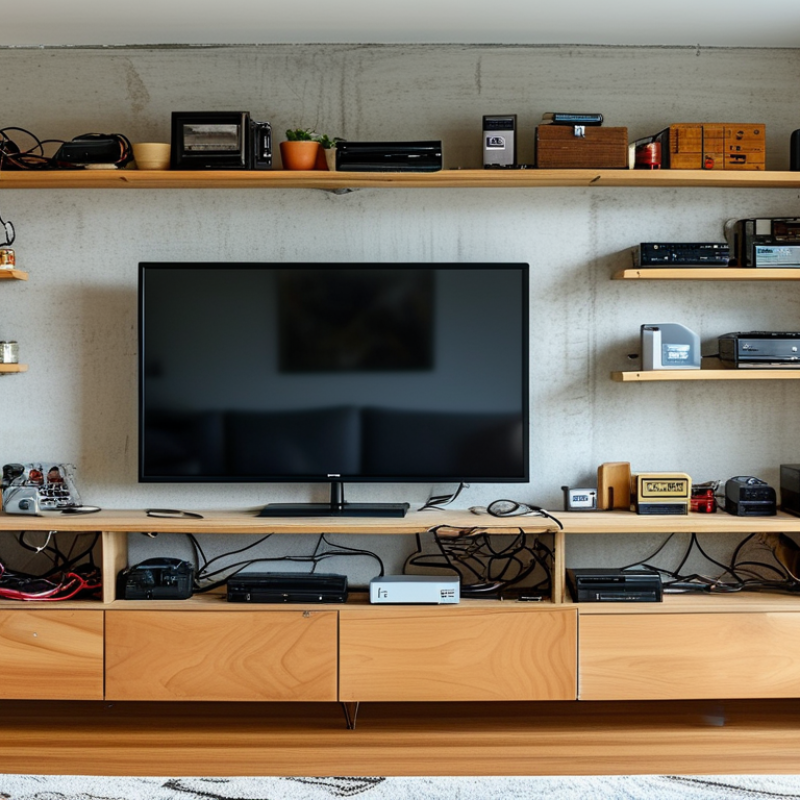
Choosing the right TV media console can drastically improve your cable management. Look for a console with built-in cable channels. These channels help conceal messy cords. A design with ample space makes it easier to hide cables while keeping devices accessible. Opt for units with back panels. This feature not only enhances aesthetics but also provides a dedicated area for cables.
Consider closed storage for additional clutter control. Cabinets can keep devices hidden and eliminate the sight of tangled cords. If you're feeling adventurous, a console with sliding doors or drawers can be quite effective. Ensure there are ventilation holes to prevent overheating of electronics.
Tip: Use cable ties to group cords together. This keeps everything tidy and manageable. Consider labeling your cables, especially if you have multiple devices. It saves time when troubleshooting. Remember, not every console will meet all your needs. You may need to compromise on aesthetics for practicality. Reflect on what matters most for your space.
Before you hide your messy cables, take a moment to identify each one. Gather all your devices and their corresponding cords. This can include HDMI cables, power cords, and charging wires. Lay them out on a flat surface to visualize what you have. Sometimes, you can be surprised by how many cables you actually own. It’s important to categorize them based on usage. You might find that some cables are unnecessary and can be removed.
Once you’ve identified your cables, it’s time to organize them. Use velcro straps or cable ties to bundle similar cables together. This prevents tangles and makes it easier to find what you need later. Labeling each wire is also beneficial. Temporary labels can help you quickly identify cords without any long-term commitment. This way, you can eliminate confusion that arises from tangled wires. It feels rewarding to see your cables neatly organized, though it may take some time to get everything just right. Don't rush this step; a little patience will lead to a cleaner, more organized media console.
The clutter of tangled cables can ruin the aesthetic of your TV media console. Using cable management accessories is an effective solution for achieving a neat look. Studies show that nearly 50% of households face challenges with messy cords. Therefore, utilizing the right tools can contribute significantly to overall decor.
Consider cable ties, cable sleeves, and hook-and-loop fasteners. These simple elements can transform your space. For example, cable sleeves can bundle multiple wires together. This not only reduces clutter but also prevents wear and tear on the cables. According to a report from the International Furniture Design Association, consumers prefer tidy spaces, influencing 70% of their purchasing decisions.
Tackling cable management can be daunting. Start by assessing your current setup. Identify cables that can be grouped or relocated. Labeling cords can also help you easily identify them later. Remember, the goal is a streamlined appearance without sacrificing accessibility. Embrace these solutions to create an organized environment that enhances your living space.
Messy cables can detract from the aesthetic of your TV media console. Decorative items can serve dual purposes by adding beauty while hiding clutter. Consider using stylish baskets or decorative boxes. They can store cables neatly while giving your setup a polished look. A vintage trunk can also double as storage and a unique focal point.
Another creative approach involves furniture choices. An entertainment unit with built-in cable management is an excellent option. However, not all units meet this need. Choosing one with hidden compartments or back panels can keep cables out of sight. In addition, plants or sculptures can be strategically placed. They can cover unsightly wires and add character to your space.
It's essential to evaluate your current setup critically. Identify areas where cables are visible and think about your solutions. Not everything will work perfectly the first time. Experimenting with various arrangements may take time, but the results can be rewarding. Adjustments may highlight areas that still feel cluttered, urging further creativity. Finding the right balance will lead to a more visually appealing entertainment space.
Keeping cables tidy over time requires regular maintenance and a bit of creativity. Start by securing cables with cable ties or clips. This simple step prevents tangling and makes your console look organized. Use adhesive cable organizers to keep cables out of sight. Place them on the back of your media console for a clean appearance.
Another effective method is to regularly check your cables. Look for signs of wear or fraying. These could indicate potential hazards. Replace damaged cables promptly. Think about the layout of your console. Arrange cables so they flow naturally, using cord covers to disguise them. This way, you maintain a neat look while ensuring safety.
Remember to clean behind your media console regularly. Dust can accumulate, tangling cables together. A quick wipe with a damp cloth keeps everything looking pristine. It's easy to forget maintenance tasks. Setting a routine, like once a month, can help you stay on track. If you find yourself with leftover cables, consider storing them in labeled boxes. Out of sight can mean out of mind, but it also keeps your space orderly.
: A good console can significantly improve how you manage your cables, making them less visible and more organized.
Look for built-in cable channels, ample space, and back panels. These features enhance aesthetics and practical usage.
Closed storage cabinets conceal devices and eliminate the sight of tangled cords, reducing visual clutter in your space.
Yes, ventilation holes are crucial as they prevent overheating of electronics, helping maintain their longevity and performance.
Use cable ties to group cords, and consider labeling them for easy identification. This simplifies troubleshooting later on.
Categorizing helps you identify unnecessary cables, making it easier to remove them and keep only what you need.
Velcro straps or cable ties work effectively to prevent tangling and to keep everything manageable.
Sometimes, you may need to prioritize practicality over aesthetics to ensure better organization and functionality overall.
It's quite rewarding to see everything neatly arranged, though achieving this may require time and patience.
Yes, temporary labels allow you to identify cords easily without making permanent choices, reducing confusion.
When considering how to hide messy cables in your TV media console, start by selecting a console designed with cable management in mind. This will facilitate a cleaner setup right from the beginning. Next, take the time to identify and organize your various cables—labeling them can be especially helpful. Utilizing cable management accessories such as clips, sleeves, or ties can further enhance the neatness of your arrangement.
For those looking for creative hiding solutions, incorporating decorative items or strategically placing furniture can effectively conceal cables without compromising your aesthetic. Finally, don't forget about regular maintenance to keep your cables tidy over time. By staying proactive and organized, you can create a visually appealing entertainment space free from messy cables.

Captain Living