Why are ergonomic accent chairs better for back pain? The answer begins with support, movement, and fit. Unlike many decorative chairs, ergonomic designs can encourage a more balanced sitting position. Their shaped backs may support the lumbar curve. Their seat depth can reduce pressure behind the knees. Some models also include firm cushioning, adjustable height, or gently angled armrests.
Small details matter.
Dr. Alan Hedge, a respected ergonomics researcher and former Cornell University professor, often emphasized, “The best posture is the next posture.” This idea explains why a supportive chair should not force your body into one rigid position. Instead, it should make healthy movement easier during reading, working, or relaxing. A chair that allows your feet to rest flat may reduce strain through your hips and lower back. A slightly reclined backrest can also distribute pressure more evenly.
Still, an ergonomic accent chair is not a medical treatment. Back pain can involve muscles, discs, joints, or conditions that furniture cannot correct. The chair may feel helpful, yet its height or firmness could suit one person poorly. That is where personal testing becomes important. Sit for ten minutes. Notice your pelvis, shoulders, and breathing. Do not ignore discomfort.
This guide explores why are ergonomic accent chairs better for back pain, while examining their real benefits and limitations. It also considers upholstery, seat depth, lumbar support, and everyday posture. The goal is practical comfort, not exaggerated promises. Sometimes, the “perfect” chair still needs a footrest, a cushion, or more movement.
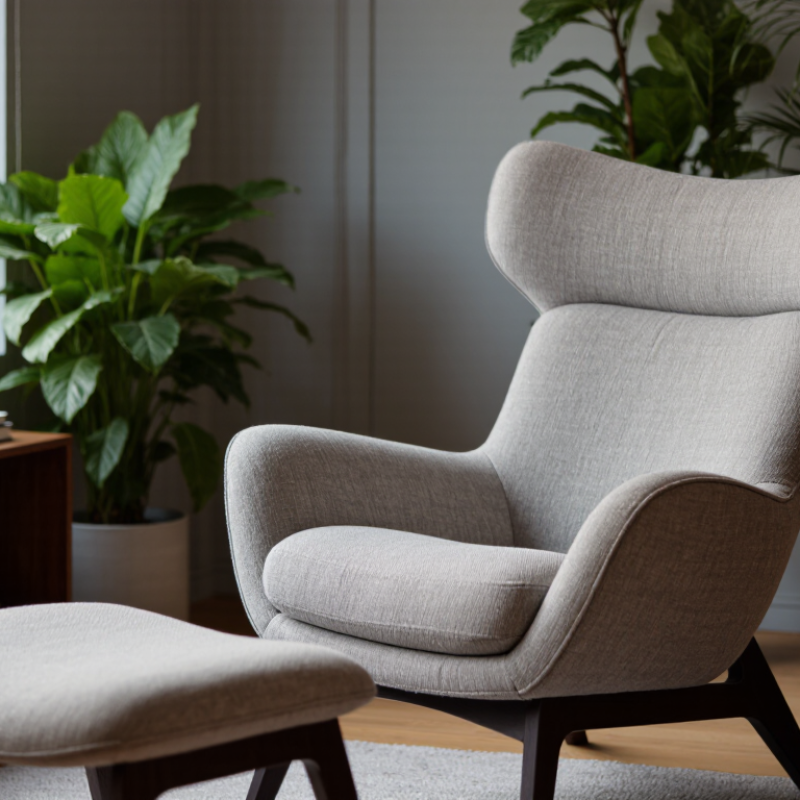
An ergonomic accent chair supports your back without forcing one rigid posture. Its backrest should follow the natural curve of your spine. Lower lumbar support matters most. It should fill the small gap above your pelvis, not push sharply into your waist. A slightly reclined angle can reduce pressure during reading or conversation.
Seat depth also defines proper support. Your feet should rest flat while two or three fingers fit behind your knees. The cushion needs firm, even support, rather than sinking like a soft mattress. Padded armrests can relax your shoulders when they keep elbows near your sides. A stable base prevents small movements that make your muscles work unnecessarily.
Adjustability improves fit. Useful features include seat-height changes, controlled reclining, and lumbar positioning. Still, no chair fixes every cause of back pain. I have found that a chair can feel excellent for ten minutes, then expose poor support later. That is worth questioning. Change positions regularly, stand briefly, and notice pressure around your hips or lower back. People with persistent, severe, or worsening pain should seek advice from a qualified healthcare professional.
Ergonomic accent chairs support the lower back, hips, and upper body during daily sitting. Their shaped backrests can encourage a neutral spine instead of a rounded posture. Adjustable seat height also helps keep both feet flat on the floor. This small detail reduces pressure under the thighs. The American Academy of Orthopaedic Surgeons recommends maintaining good posture and changing positions regularly to reduce back strain.
The evidence needs careful reading. A chair cannot cure every back problem. The World Health Organization reported that low back pain affected about 619 million people worldwide in 2020. It also projects 843 million cases by 2050. In workplace data, the U.S. Bureau of Labor Statistics recorded 946,400 work-related musculoskeletal disorder cases involving days away from work in 2023. These figures show the scale of the problem, not proof that one chair prevents it.
A useful chair should feel supportive, not rigid. Sit fully back, with your hips level with or slightly above your knees. Leave two to three fingers behind your knees. Keep the screen near eye level. Move every 30 to 45 minutes. I still catch myself sitting unevenly when tired. That matters. Even an ergonomic chair performs poorly when used for long, motionless hours. Pain that persists, spreads, or causes weakness needs professional medical assessment.
An ergonomic accent chair should support your body without making the room feel clinical. Look for firm, adjustable lumbar support that fills the natural curve above your hips. When I tested a chair at home, I noticed less slouching after twenty minutes. However, support that feels helpful to one person may feel too strong to another. Back comfort is personal.
Seat depth matters more than many shoppers expect. Your feet should rest flat, with two or three fingers of space behind your knees. A seat that is too deep can push your pelvis forward. That position may increase lower-back strain. Choose a height that lets your knees stay near hip level. A slightly firm cushion usually supports better than a soft cushion that collapses quickly.
Armrests can reduce shoulder tension, especially during reading or laptop use. They should let your elbows rest naturally, without lifting your shoulders. A stable base, smooth swivel, and breathable fabric also improve daily comfort. Avoid chairs that wobble or trap heat. I once preferred a stylish, deep chair, but it encouraged poor posture. That was my mistake. No chair replaces movement, stretching, or professional medical advice when pain persists. Test the chair for several minutes before buying, and check whether you can change positions easily.
Ergonomic accent chairs can reduce strain, but only when their dimensions match your body. A stylish chair may still create pressure behind your knees or leave your shoulders unsupported. I learned this after choosing a deep seat that looked comfortable. After twenty minutes, my lower back felt tired.
Measure your sitting height, hip width, and available floor space. Your feet should rest flat, with knees close to a right angle. Choose firm, supportive cushioning instead of a sofa-like sink.
A slightly curved backrest should support your lumbar area without pushing you forward. Armrests help when they let your shoulders relax. Fixed arms, however, can waste space in a narrow reading corner.
Tips: Sit for ten minutes before buying. Check whether you can stand easily. Leave several inches around the chair for movement. Test it with your usual shoes. A compact swivel model may fit a small room, but its motion could disturb nearby tables. Consider your real routine, not an ideal one. If you read, keep your head balanced over your spine. Occasional work may require a separate footrest or lumbar cushion. These adjustments help, but they are not magic. Persistent back pain deserves advice from a qualified healthcare professional.
Why Are Ergonomic Accent Chairs Better for Back Pain Tips?
An ergonomic accent chair can reduce back strain by supporting the spine during relaxed sitting. Its backrest should follow your natural curve without forcing an exaggerated posture. Your feet should rest flat on the floor, with knees close to hip height. Small adjustments matter. I initially sat too far forward, which increased pressure around my lower back. Moving my hips fully against the backrest made the chair feel more supportive.
Use the chair for reading, conversation, or short computer tasks, rather than prolonged work sessions. Check that your shoulders remain relaxed and your elbows stay near your body. A small cushion may fill a gap behind your waist, but it should not push your spine forward. Keep the chair on a stable, level surface. Loose rugs can cause unexpected movement. Stand up every 30 to 45 minutes and walk briefly.
Do not ignore numbness, leg weakness, or pain that steadily worsens. An ergonomic chair cannot correct every spinal condition. A qualified healthcare professional can assess persistent symptoms and recommend suitable support. Also, inspect the chair regularly for loose joints, damaged padding, or unstable legs. Comfort can be misleading. A soft seat may feel pleasant initially, yet it can allow your pelvis to slump. Recheck your posture after ten minutes, not just when you first sit down.
| Ergonomic Dimension | Evidence-Informed Target or Check | Why It Matters for Back Comfort | Safe-Use Best Practice |
|---|---|---|---|
| Seat Height | Adjust the seat so both feet rest flat on the floor and the knees remain approximately level with, or slightly lower than, the hips. | Supports a stable pelvis and reduces pressure caused by dangling feet or excessive knee elevation. | Use a stable footrest if the chair cannot be lowered enough for comfortable foot contact. |
| Seat Depth | Leave approximately 2–3 fingers of space between the front edge of the seat and the back of the knees. | Helps avoid pressure behind the knees while allowing the backrest to support the pelvis and lower back. | Do not slide forward to escape a seat that is too deep; adjust the chair or add appropriate lower-back support. |
| Seat Firmness | Choose cushioning that supports the body without allowing the hips to sink deeply into the seat. | Balanced cushioning can help distribute pressure and make it easier to maintain a neutral sitting position. | Replace or reposition cushions that cause the pelvis to tilt backward or create numbness. |
| Lumbar Support | The backrest should support the natural inward curve of the lower back near the belt-line area. | Appropriate lumbar support can reduce slouching and limit sustained strain on the lower-back muscles. | Use only enough support to fill the curve comfortably; excessive padding can push the lower back forward. |
| Backrest Angle | A slightly reclined position of about 100–110 degrees is commonly more comfortable than sitting rigidly upright. | A supported recline can reduce the load associated with prolonged, unsupported upright sitting. | Keep the backrest locked or stabilized so it does not unexpectedly tip backward. |
| Armrest Position | Position armrests so the shoulders stay relaxed and the elbows remain close to the body at roughly a right angle. | Reduces shoulder tension that can contribute to compensatory upper-back and neck strain. | Do not lean heavily on one armrest, and remove armrests that prevent the chair from fitting under a desk. |
| Head and Neck Alignment | Keep the head balanced over the torso rather than projecting forward. | Forward-head posture can increase upper-back loading and encourage whole-spine slouching. | Place reading material or screens near eye level when using the chair for extended tasks. |
| Pelvic Position | Sit back against the backrest with the pelvis centered and weight distributed evenly on both sitting bones. | Promotes a more neutral spinal position and reduces twisting or one-sided loading. | Avoid sitting on one leg, crossing the same leg for long periods, or perching on the front edge. |
| Movement Frequency | Change position frequently and take a brief movement break at least every 30–60 minutes during prolonged sitting. | Movement helps reduce stiffness and limits the effects of static loading. | Stand, walk, gently extend the hips, or move the shoulders; do not force painful stretches. |
| Chair Stability | The chair should sit level on the floor and remain stable during sitting, standing, and reclining. | Stability reduces sudden twisting, loss of balance, and protective muscle tension. | Inspect legs, joints, casters, and reclining mechanisms regularly, especially before daily use. |
| Task Compatibility | Use the chair for activities that match its support and height, such as reading, conversation, or short computer sessions. | An accent chair may not provide the adjustability required for long-duration desk work. | For extended computer use, pair the chair with a suitable work surface and keep the screen, keyboard, and mouse within comfortable reach. |
| Pain Monitoring | Comfort should remain stable or improve during use; increasing pain is a signal to change position or stop. | Persistent discomfort may indicate a poor fit, excessive sitting time, or an underlying condition. | Seek professional medical advice for severe or persistent pain, numbness, weakness, or pain that travels down an arm or leg. |
It follows your spine’s natural curve and supports the lower back without forcing one rigid posture.
It should fill the small gap above your pelvis. It should not press sharply into your waist. Comfort varies.
Your feet should rest flat, with two or three fingers of space behind your knees. A deep seat may push your pelvis forward.
Choose even, moderately firm support. A cushion that collapses like a soft mattress may encourage slouching.
Your knees should stay near hip level, with both feet comfortably touching the floor. Small adjustments can matter.
Yes. They should let your elbows rest near your sides without lifting your shoulders during reading or laptop use.
Seat-height changes, controlled reclining, and adjustable lumbar positioning can improve fit. More adjustment does not guarantee better comfort.
Sit for several minutes, change positions, and notice pressure around your hips and lower back. Ten minutes can reveal little.
No chair fixes every cause of pain. Stand briefly, move regularly, and seek qualified medical advice for persistent or worsening pain.
I once chose a stylish, deep chair, but it encouraged poor posture. Appearance alone was not enough.
Why are ergonomic accent chairs better for back pain? They are designed to combine supportive structure with the comfort and style of a decorative chair. An ergonomic accent chair for back support typically offers a well-shaped backrest, balanced cushioning, stable seat height, and enough depth to encourage a neutral sitting posture. These features can help distribute pressure more evenly, reduce strain on the lower back, and support healthier alignment during reading, relaxing, or working.
When choosing a chair, consider your height, weight, leg length, preferred firmness, and available space. Look for adjustable or well-positioned lumbar support, supportive armrests, breathable materials, and a seat that allows your feet to rest flat on the floor. Use the chair safely by sitting upright, keeping your shoulders relaxed, avoiding prolonged static positions, and taking regular movement breaks. The right ergonomic accent chair should complement your room while supporting your body comfortably and consistently.

Captain Living